
How to keep your torrent sites in one app, without opening a browser
Short answer
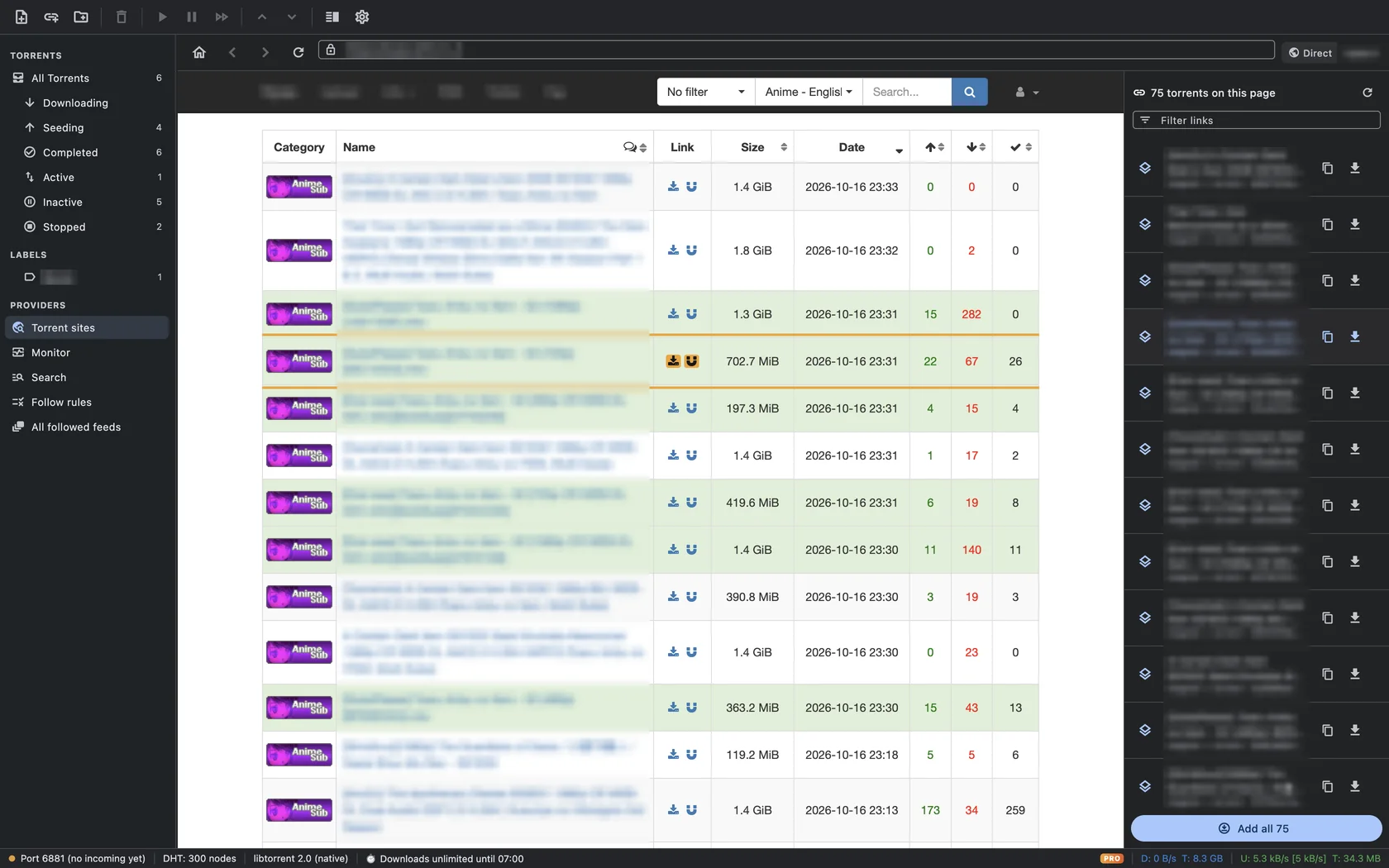
Click Torrent sites in the TorMonitor sidebar (⇧⌘B). Add each site you use with Add site, then open it: TorMonitor browses it inside the app and lists every magnet and .torrent link on the page in a sidebar, so you can add one torrent or Add all without a browser, pop-ups or download folders.
Most people find torrents in a web browser: open a site, dodge the pop-ups, click a magnet link, confirm that the browser may open the torrent client, switch apps. TorMonitor folds those steps into one window. Your sites are saved in the sidebar, pages open in the app, and every torrent on the page is waiting in a list beside it.
Steps to set up your sites#
- Click Torrent sites in the sidebar, or choose Providers ▸ Torrent Sites (⇧ ⌘ B).
- Browse the built-in directory of legal sources, grouped as Generic, Games & Software, Movies and Anime & Animation: the Internet Archive, Academic Torrents, FOSS Torrents, Linux distributions and more.
- To add your own, click Add site, paste the address of the page you use most (a search or "latest" page works well), optionally give it a name and category, and save. It appears under My sites with a preview image after your first visit.
- Click a site to open it. Browse and search it as you would in Safari.
- Use the list on the right: click the download button next to a torrent to add it, the copy button to copy its link, or Add all to add every torrent on the page.
How the link list works#
- TorMonitor scans the page for magnet links and links to .torrent files.
- When a site offers the same torrent as both a magnet and a .torrent file, the two are merged into one entry using the info-hash, the shared table row or the name. You see each torrent once, labelled "magnet + .torrent".
- Hover an entry and the matching row on the page is outlined and scrolled into view, so you can check its size and seeders.
- Filter links narrows the list by name; Rescan page picks up results that loaded later.
- Torrents already in your list are marked so you don't add them twice.
Reaching sites your network blocks#
Some networks and internet providers block torrent sites by name. TorMonitor Pro can send the site browser through its own proxy or encrypted DNS, without changing anything else on your Mac. See how to reach blocked torrent sites with a proxy or DNS over HTTPS.
Questions#
How many sites can I save?#
Free users can save 5 of their own sites in addition to the built-in directory. TorMonitor Pro removes the limit.
Can I use sites that need an account?#
Yes. The site browser is a full web view, so you can sign in to sites that require an account. When adding a torrent, TorMonitor prefers the magnet link, which works without the site's cookies, and falls back to the .torrent file.
Can I still use my normal browser?#
Yes. TorMonitor opens magnet links and .torrent files from any browser and from Finder.
Is there a search across all my sites?#
Searching across sources is what the provider monitor does: add the sites' RSS feeds or a Jackett / Prowlarr Torznab API and use Search Providers (⇧⌘F). See how to monitor torrent providers.