
How to schedule torrent downloads on Mac (download only at night)
Short answer
Open Preferences (⌘,) ▸ Scheduler, turn on Enable downloading schedule, set the Active hours (for example 23:00 – 07:00), choose a speed or Unlimited, and set Outside these hours to Pause downloading. A separate Seed schedule does the same for uploading. The scheduler is part of TorMonitor Pro.
Scheduling is useful when your internet plan has off-peak hours, when you share the connection during the day, or when you only want your Mac uploading at night. TorMonitor has two independent schedules: one for downloading and one for seeding.
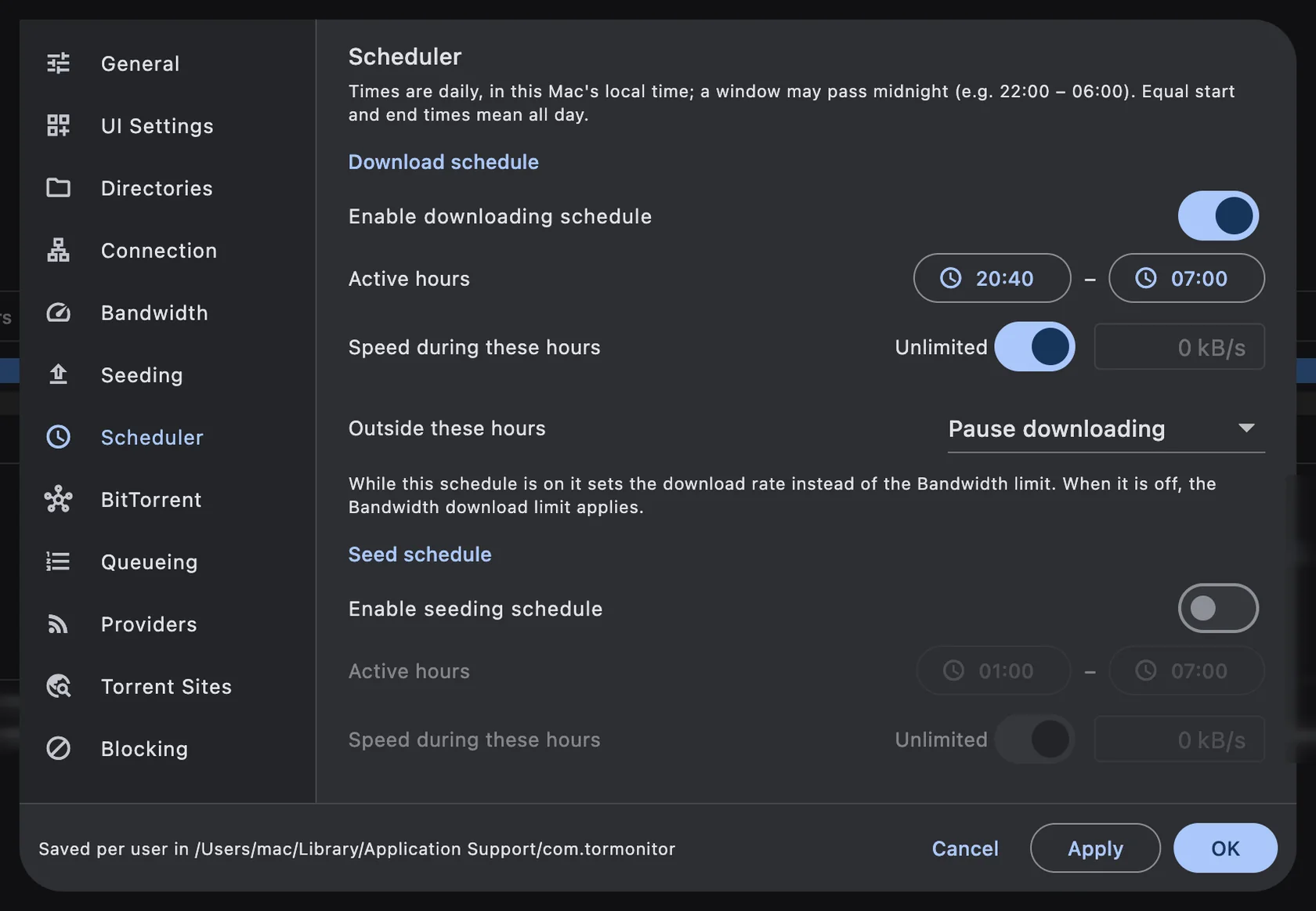
Steps to schedule downloads#
- Open TorMonitor ▸ Preferences… (⌘ ,) and choose Scheduler.
- Under Download schedule, turn on Enable downloading schedule.
- Click the two time buttons next to Active hours to set when downloading is allowed, for example 23:00 and 07:00.
- Next to Speed during these hours, leave Unlimited on, or turn it off and type a limit in kB/s.
- Set Outside these hours to Pause downloading, or to Use the Bandwidth limits if you'd rather download slowly during the day than not at all.
- Click OK. The status bar now shows the schedule, for example "Downloads unlimited until 07:00".
Schedule seeding separately#
The Seed schedule below works the same way for uploading: turn on Enable seeding schedule, pick the hours and speed, and choose whether seeding pauses outside them. A common setup is downloading all night and seeding only during the night as well, so your upload doesn't compete with video calls during the day.
Good to know#
- Times are daily, in your Mac's local time.
- A window can pass midnight: 22:00 – 06:00 works as you'd expect.
- Equal start and end times mean all day.
- While a schedule is on, its speed replaces the matching limit on the Bandwidth page. When you turn the schedule off, the Bandwidth limits apply again.
- Torrents paused by a schedule resume on their own when their hours begin. If you start one yourself, it keeps running until the next change of schedule.
- Your Mac needs to be awake for TorMonitor to download. Check System Settings ▸ Battery (or Energy) to keep it from sleeping when plugged in.
Questions#
Can I have different schedules for weekdays and weekends?#
Not yet. Each schedule is one daily window that repeats every day.
What if I need a download right now, outside the window?#
Select the torrent and click Start or Force Start. It runs until the next change of schedule, then follows the schedule again.
Does the scheduler limit upload speed while downloading?#
The download schedule only sets the download rate. Use the seed schedule, or the upload limit on the Bandwidth page, to control uploading.
Is the scheduler free?#
No, the scheduler is a TorMonitor Pro feature. Pro is a one-time purchase.